Training Services
Overview
Training services support training models from scratch and training or fine-tuning models with your own datasets. An easy-to-use interface and high-performance GPU clusters help users complete training tasks efficiently.
Training
Features
With training services, you can:
- Configure GPU resources designed for efficient training.
- Set up training workflows through an easy-to-use console.
- Monitor training in real time through the console and logs, tracking metrics such as loss and accuracy.
Access the Training Console
- Sign in to the platform console and open Training.
- Review the task list, which shows task names, GPU configurations, GPU memory, models, resource usage, and available actions.
Create a Training Task
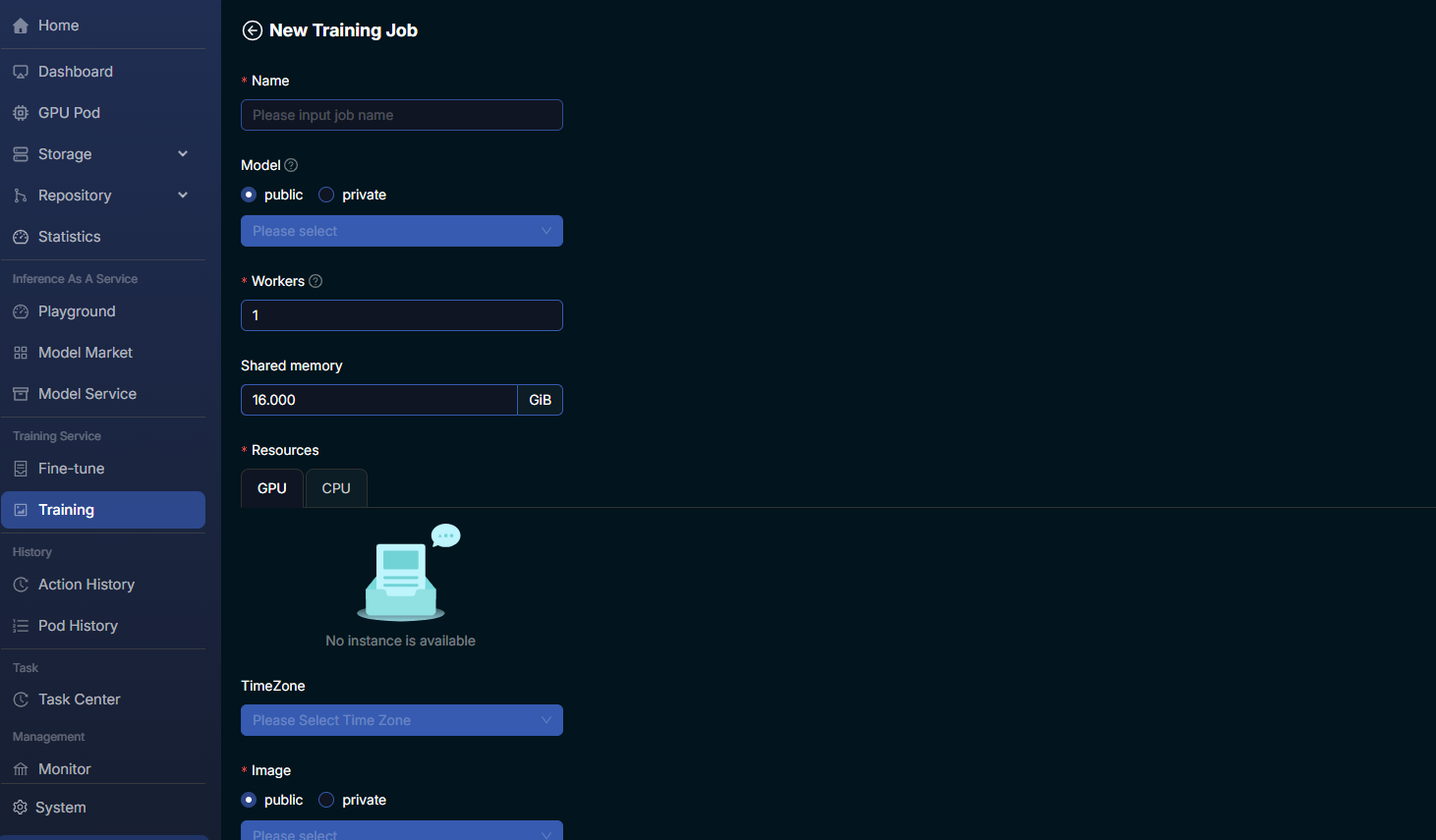
- Step 1: Click the + button next to a task to create a new training task.
- Step 2: Complete the task parameters listed below.
- Step 3: Review the configuration and click Confirm to deploy the task.
| Parameter | Description |
|---|---|
| Name | A unique name for the training task. |
| Model | The model used for training. Choose public or private models, such as meta-llama-3-8b-instruct. |
| Workers | The number of worker processes. |
| Shared memory | Shared memory size, such as 16 GiB. |
| Resources | GPU / CPU resource type and instance specifications, such as 2 × Tesla P40 with 24 GiB of GPU memory. |
| TimeZone / Image | The task time zone and runtime image (public / private). |
Tip
Select a GPU count and GPU memory capacity appropriate for your training requirements.
Manage Training Tasks
- View task details: Click a task name to view status, resource usage, and performance metrics.
- Delete tasks: Click Delete for the corresponding task in the list.
Warning
Deletion is permanent and cannot be undone. Delete a task only after confirming that it is no longer needed.
- TensorBoard integration: For supported tasks, click TensorBoard to visualize training metrics and logs.
- Resource usage monitoring: Review the Resource column to monitor GPU hours consumed by each task and manage costs and resource allocation.
Fine-tune
Features
Fine-tuning provides a straightforward way to customize pretrained models with user-specific data. Through transfer learning, it can substantially reduce training time and improve accuracy in specialized domains. Key capabilities include:
- Custom dataset integration: Easily upload and integrate your own datasets for fine-tuning.
- Parameter customization: Adjust the learning rate, number of epochs, and other fine-tuning parameters.
- Performance evaluation: Use evaluation tools to assess whether the model meets your requirements.
- Resource optimization: Use the platform's infrastructure to optimize resource allocation, reducing overall training time and compute costs.
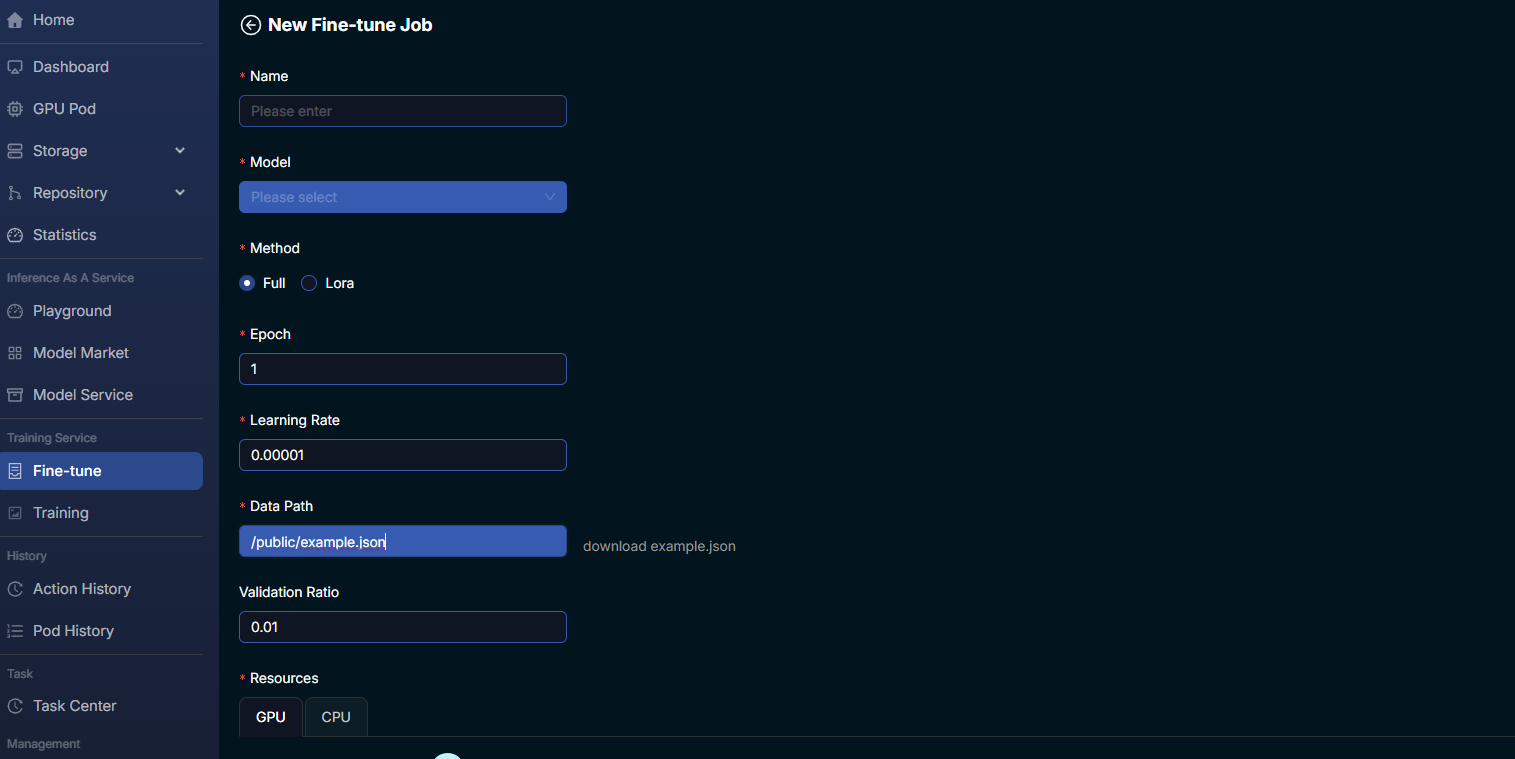
Usage Steps
| Step | Instructions |
|---|---|
| 1. Select a pretrained model | Browse the model repository and choose a model based on its architecture, original training task, and compatibility with your dataset. |
| 2. Upload a dataset | Provide the dataset location through Data Path. Ensure the data is correctly formatted and contains the required metadata. The platform provides a sample file through download example.json. |
| 3. Configure fine-tuning parameters | Select Method: Full fine-tuning or LoRA (low-rank adaptation). Configure Epoch, Learning Rate, and Validation Ratio. |
| 4. Evaluate performance | After fine-tuning, use evaluation tools to assess metrics such as accuracy, precision, recall, and F1 to confirm that requirements are met. |
| Parameter | Description |
|---|---|
| Learning Rate | The step size used to move toward a minimum of the loss function in each iteration. |
| Epochs | The number of times the learning algorithm processes the entire training dataset. |
| Batch Size | The number of training samples used in one iteration. |
| Validation Ratio | The proportion of training data set aside for validation. |
Advanced Configuration
Advanced users can:
- Adjust hyperparameters to improve model performance.
- Integrate custom training scripts for a more tailored fine-tuning workflow.